Stop studying everything.
Study what you're getting wrong.
DeepRevision turns your notes, slides and lectures into questions, finds the ones you keep missing and why, and brings each one back right before you'd forget it.
Free to start · No card required · Web & Android
The revision loop
The revision loop: your notes become questions in every format, practised in five modes. Got it right? Spacing grows. Missed it? See why — the wrong way and the right way of thinking — ask Sage or listen to the podcast, then practice again; it comes back sooner. Every question comes back when it's due, and Memory Room shows what's fading. Right every time? Teach it back: pass and it's Mastered, gaps found and you go back to see why.
Reading your page…
Real pages and real questions from the app — every question points back to the line it came from.
8
kinds of material
PDFs, slides, Word files, photos, scans, lectures, YouTube links or just a topic.
6
ways to practise
Multiple choice, true or false, fill in the blanks, matching, flashcards and image labelling.
FSRS
review scheduling
The open spaced-repetition algorithm Anki adopted, on every question you answer.
Mistake analysis
Every wrong answer, sorted, labelled and explained
Mistakes are filed by subject, topic and subtopic, the way your syllabus is, with your accuracy at every level. Each one is labelled with how it went wrong — a concept mix-up, a careless slip, time pressure — from your attempts and timing. Open one and the AI tells you why you missed it, and YouTube tutorials can be pulled in for that exact question.
- Subject → topic → subtopic, with accuracy for each
- 7 error types: conceptual, careless, time pressure and more
- AI diagnosis, the right way to think about it and a memory hook
- YouTube tutorials picked for the question you got wrong
0
Mistakes
0
Subjects
0
Topics
0%
Avg acc
Medical Science
5 items to master
Biology
4 items to master
Physics
3 items to master
Why you make mistakes
Every mistake labelled from your attempts and timing
- Conceptual Confusion–
The same wrong answer, again and again
- Careless Mistake–
A fast slip on one you've got right before
- Time Pressure–
Rushed before you'd shown you know it
- Misreading Question–
Too quick for its length, or a missed NOT
- Formula Error–
The concept mix-up is in a formula
- Guessing–
A different wrong answer each time
- Overthinking–
Far longer than the question needs
Question 4 / 12
What factors influence blood pressure?
Question 3 / 12
What happens when blood pressure drops?
Answer
The body increases sympathetic activity to the SA node and blood vessels, raising heart rate and blood pressure.
Spaced review
Each question comes back right before you'd forget it
Say how well you knew it and the next review is booked: tomorrow for the shaky ones, weeks away for what's locked in.
- Per question, not per deck
- Every format, not just flashcards
- Today's queue only holds what's fading
Teach it back · the Feynman technique
If you can't explain it simply, you don't know it yet
Pick a Sage answer, a study-plan section or a moment from a lecture, and explain it in your own words — typed or out loud. Your explanation is checked idea by idea against your own pages, and a curious beginner asks about whatever you left out. Revise until every idea is there.
- Checked against your own source, every hint linked to its page
- A beginner asks “why?” about the gaps — and never gives the answer
- Cover every idea and a harder audience asks “what would happen if…”
- Turn the ideas you missed into practice questions in one tap
Teach it back
Explain what the nucleus does as if to a friend who's never heard of it.
Round 1
Explain it in your own words…
Key ideas from your pages
0 / 4
Hidden, so it isn't a crib sheet
Hidden, so it isn't a crib sheet
Hidden, so it isn't a crib sheet
Hidden, so it isn't a crib sheet
[1] Page 67
[2] Page 68
Mind maps
See the whole chapter on one page
Any section of your study plan, or any lecture, becomes a map of its ideas: the topic in the middle, its branches around it, the key points on each. Tap an idea and it's explained from the pages it came from. Answer a practice question and the map shows exactly where that question sits.
- Made from a study-plan section or a lecture
- Tap any idea to have it explained, with the page cited
- Practice questions point to their place on the map
- Rename, add or move ideas to make it your own
Study plan section
The cardiovascular system
Pages 205–231
5
branches
15
key points
Every branch and point comes from the section's own pages, so the map covers what you were set, not a generic syllabus.
Study plan and exam date
Set your exam date. See every day whether you're on track.
Upload the whole textbook and it's split into ordered sections, each with its own pages, questions and mastery. Add your exam date and the plan counts down, works out how many minutes a day you need, and points at the next section. The night before, Cram puts your shakiest sections first.
- Days left, sections mastered and the next section to study
- Minutes a day you need, next to the minutes you planned
- Cram: shaky sections first, 25-minute blocks, one final mock
- A page map shows which pages you've never been quizzed on
Study plan
Exam mode
Anatomy midterm
5
days left
You need
33 min/day
You planned
45 min/day
- Cells and tissuesp. 1–34
- The integumentary systemp. 35–58
- The skeletal systemp. 59–96
- The muscular systemp. 97–140Next
- The nervous systemp. 141–212
- The sensesp. 213–246
- + 8 more sections
Next section: The muscular system
Cram session
How long have you got? Shaky sections come first.
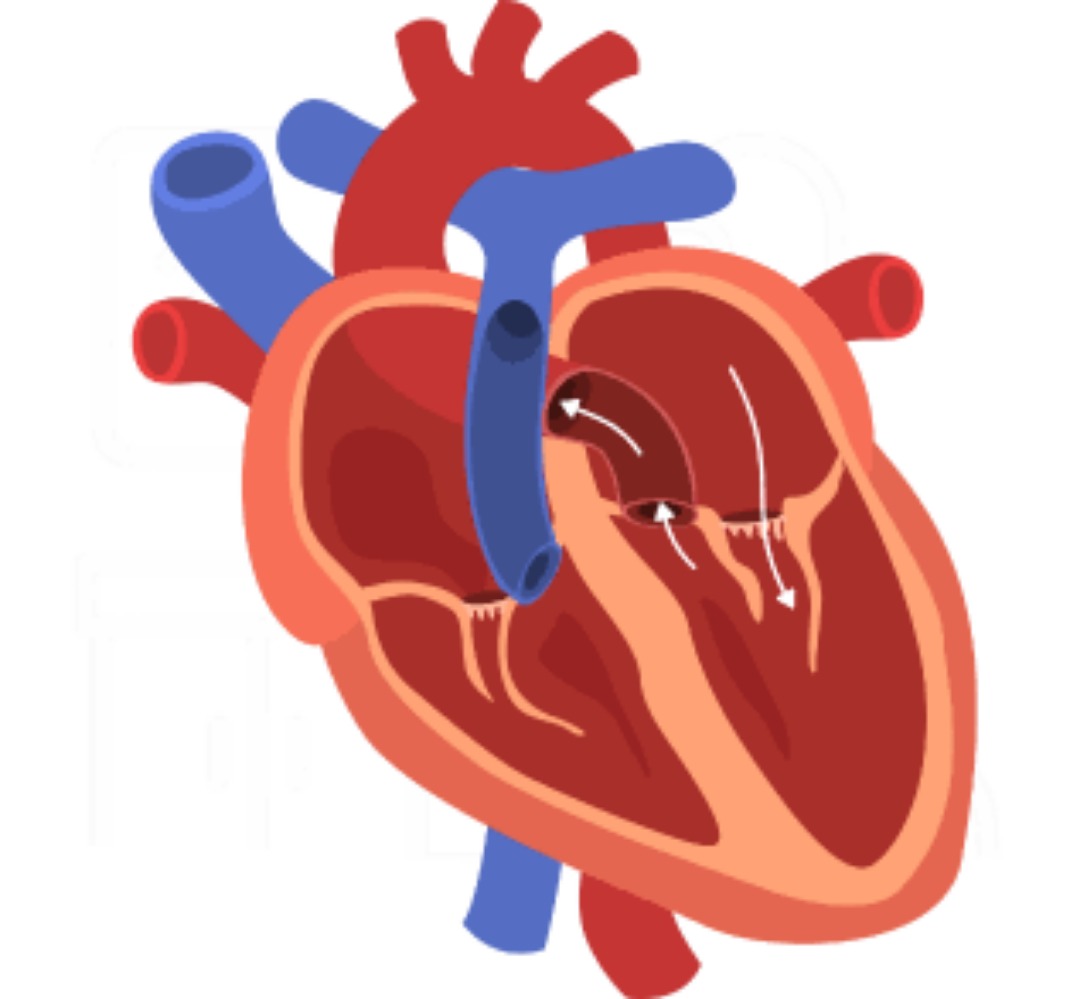
Image labelling
Press trace. Every part finds its own outline.
Pin the parts of any diagram and auto-trace outlines each one from the picture itself. Then hide the names and find every part again.
- Anatomy, histology, circuits, maps, scans
- Identify, review and exam modes
- Marked on the image, not from a list
Blood Flow in the Human Heart
Study Mode
Recording
24:12
Lecture capture
Record the lecture. Walk out with the questions.
Mark the moments that matter and snap the board as you go. The transcript stays synced to the audio and turns into practice that evening.
- Live transcript
- Marks and board photos on the timeline
- Questions written from what was said
Podcasts
Turn any topic into a two-voice podcast
Nova, the curious student, asks. Alloy, the tutor, explains. Make one from a topic, a chapter of your study plan or your own mistakes, and read along as the transcript follows the audio.
- A student who asks and a tutor who explains
- The transcript highlights each sentence as it's spoken
- Download it and listen offline on the way in
Sage, your AI tutor
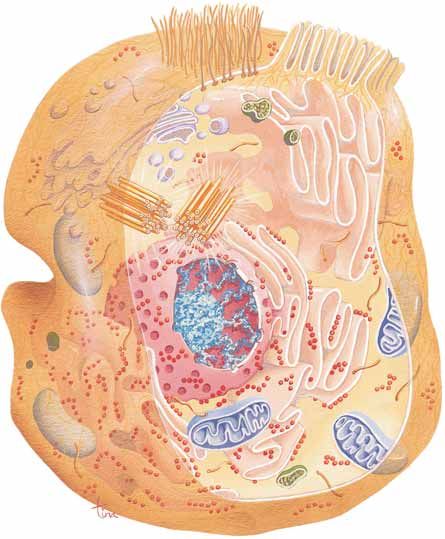
Answers from your own pages, figures included
Ask anything about what you're studying. Sage answers from your material, pulls the right figure straight out of the PDF, and numbers every claim so you can open the page it came from.
- Figures taken straight from your PDF
- Every claim linked to its page
- Or answer from the web or YouTube instead
Sage
Your AI tutor
Ask anything about your material…
Your material
68
Your study plan's source PDF
Solve and explain
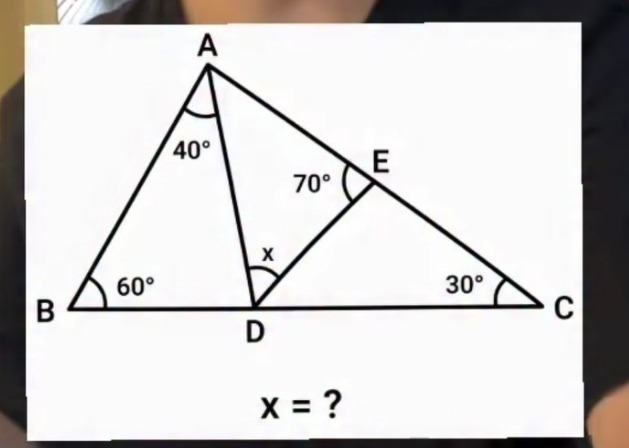
Snap a problem. Get every step — and any step explained like you're 10.
Photograph a question from your book or the board. It comes back worked step by step, and any line you don't follow can be explained again in plain words — in English or your own language.
- Step-by-step working, each step named
- Explain any step like you're 10
- Then test yourself with Concept Check and Spot the Error
Your photo
Reading…
Step-by-step solution
Triangle Angle Chasing Problem
Approach. Find the angles of the big triangle ABC first, then use the angle sum of triangle ADE to find x.
Find angle BAC in the big triangle
Find angle DAE
Find x in triangle ADE
Works offline
No signal? Keep studying.
Download your library once and the Android app runs on its own. Your questions, flashcards, PDFs, lectures and podcasts live on your phone, and everything you answer is saved there and syncs by itself when you're back online.
- Practice, review and exams with no connection
- Your PDFs, lecture audio and podcasts on the phone
- Answers sync on their own when you reconnect
Making new questions, asking Sage and transcribing lectures need a connection. Offline study is in the Android app.
Download once
Questions, PDFs, lectures and podcasts saved to the phone.
- 1
Download once
Questions, PDFs, lectures and podcasts saved to the phone.
- 2
Lose the signal
A flight, the metro, a hall with no Wi-Fi.
- 3
Keep studying
Answer questions, open the source page, review cards.
- 4
It syncs itself
Back online, your answers upload on their own.
Download manager
Saving your library to this phone…
Questions
Everything you have generated to practise with
Study plans
Your plans, their sections and source files
Image labelling
Labelled diagrams and their pictures
Lectures & podcasts
Recordings, transcripts, notes, audio and recaps
Everything you get
One library of your own material, and everything you can do with it, from the first upload to exam day.
Bring your material
Questions are written from what you upload, not a fixed bank.
PDFs, slides and Word files
One chapter or a 400-page textbook. Scanned pages and photos of notes are read too.
Lectures
Record in the room or upload the audio. The transcript becomes questions.
See it in actionYouTube links
Paste a link and practise on what the video actually says.
Just a topic
Nothing to upload? Type a topic and get a set to start with.
Highlight to questions
Select any line of your PDF and turn it into questions on the spot.
Whatever you're studying
Bring a textbook, slides or past papers. The questions are written from your material, not a fixed syllabus.
- Physics
- Chemistry
- Biology
- Earth Science
- Environmental Science
- Agriculture
Made for learning, not shortcuts
Checkable, not made up
Every generated question links to the page and line it came from, so you can check it against the source.
Built to make you think
Practice explains as you go, exam mode gives nothing away, and worked solutions come with Spot the Error checks.
Private by default
Everything you make starts private. Delete your account from the app or the web and your content goes with it.
Study on every screen
Start in the browser today — your library and review queue follow you into the app.
Questions people ask first
What can I upload?
PDFs, Word documents, plain text, slide decks, spreadsheets, and photos or scans of pages. Scanned PDFs with no text layer are read as images, so photocopied handouts work too. You can also record a lecture in the app, paste a YouTube link, or skip files entirely and just name a topic.
What is FSRS, and why does the scheduling use it?
FSRS is an open, research-backed spaced-repetition scheduler — the same family of algorithm Anki adopted as its modern scheduler. Instead of fixed 1-3-7 day intervals, it models three things per question: how difficult you find it, how firmly it's stuck, and how likely you are to recall it right now. Reviews are booked for the point where your predicted recall falls to about 90%, which is early enough to save the memory and late enough not to waste the repetition. In practice that means far fewer reviews for the same retention.
Does spaced repetition only apply to flashcards?
No, and that's the main difference from most study apps. Multiple choice, true/false, fill in the blanks and image labels each carry their own schedule, so your daily review queue is a mix of formats drawn from everything you've studied — not a separate card deck you have to maintain by hand.
How is this different from an AI chatbot?
A chatbot answers the question in front of it and forgets you. DeepRevision keeps a model of what you know: it stores every question you've missed, groups those mistakes by subject and topic, tracks which topics are slipping, and puts them back in front of you on a schedule. Generating the material is the easy part — the follow-through is the product.
Is it free?
There's a free tier you can use without a card. It covers a daily allowance of AI work — study plans, question generation, solutions and transcription. A paid plan raises those limits. Anything you've already created stays yours either way.
Can I trust the questions it generates?
Treat generated material as a strong first draft, not a textbook. Questions are built from the pages you supplied and each one is tied back to the part of the source it came from, so you can check it against the original. Every set is editable — fix a wrong option or reword a question and it stays fixed.
Does it help me cheat?
No — it's built for the opposite. Exam mode is timed and gives nothing away, mistakes are recorded rather than glossed over, and the solver's Spot the Error and Concept Check modes exist specifically to stop you copying a worked answer you haven't followed.
Which exams does it cover?
Any exam you have material for. The questions are written from what you upload — textbooks, lecture slides, past papers, your own notes — so you're not limited to a fixed syllabus. You can also browse sets other learners have shared in Explore.
What happens to my documents?
They're stored against your account so your library works on every device you sign in from, and processed by the services needed to read and generate from them. Everything you create is private by default. Delete your account and your content goes with it, with personal data removed within 30 days.
Do I need the phone app?
The mobile app is the full experience — lecture recording, image labelling and review on the go all live there. The web app covers your library, study plans and practice, so you can sign in from a laptop and carry on.
Does it work offline?
Yes, in the Android app. Download your library from the download manager and your questions, flashcards, study plans with their PDFs, labelled diagrams, lecture audio and podcasts stay on the phone. Practice, review and exams all run with no connection, and every answer is saved on the device and uploads by itself when you're back online. Making new questions, asking Sage and transcribing a lecture need the internet.
Start with the chapter you're least sure of
Upload it, answer a few questions, and let the schedule decide when you see them again. Free to start, no card needed.
Get started — it's free